Bazarr
Bazarr is an open-source subtitle manager for movie and television libraries managed by Sonarr and Radarr. It synchronizes the library metadata, searches configured subtitle providers and writes matching subtitle files beside the media that those applications manage.
Moltern gives Bazarr a public HTTPS URL, persistent configuration storage, health checks, controlled public egress and service lifecycle controls. Bazarr accounts and API credentials are separate from your Moltern account.
Current Support Status
The Moltern deployment, web UI, form authentication, language profiles, outbound provider access, configuration persistence, byte metering and cleanup have been validated end to end.
The current catalog template does not automatically provision Sonarr or Radarr and does not yet attach a shared media-library path to all three services. Bazarr needs both private API connectivity and direct filesystem access to the same movie or series files before it can download usable subtitles. Treat the current template as an evaluation deployment until that explicit media-library attachment workflow is available and tested.
Before You Start
You need permission to deploy services in the target workspace and environment. For a complete Bazarr workflow, also prepare:
- A compatible Sonarr service for television libraries, a Radarr service for movie libraries, or both.
- The Sonarr and Radarr API keys.
- A media library that Bazarr, Sonarr and Radarr can access through consistent paths.
- Accounts for the subtitle providers you intend to use. Some providers have rate limits, CAPTCHA services or paid plans.
- A backup and recovery plan for Bazarr configuration and the media library.
Do not use localhost for Sonarr or Radarr. Inside a container, loopback means
the Bazarr container itself. Use a reachable private service address and test
the connection from Bazarr.
Deploy In Moltern
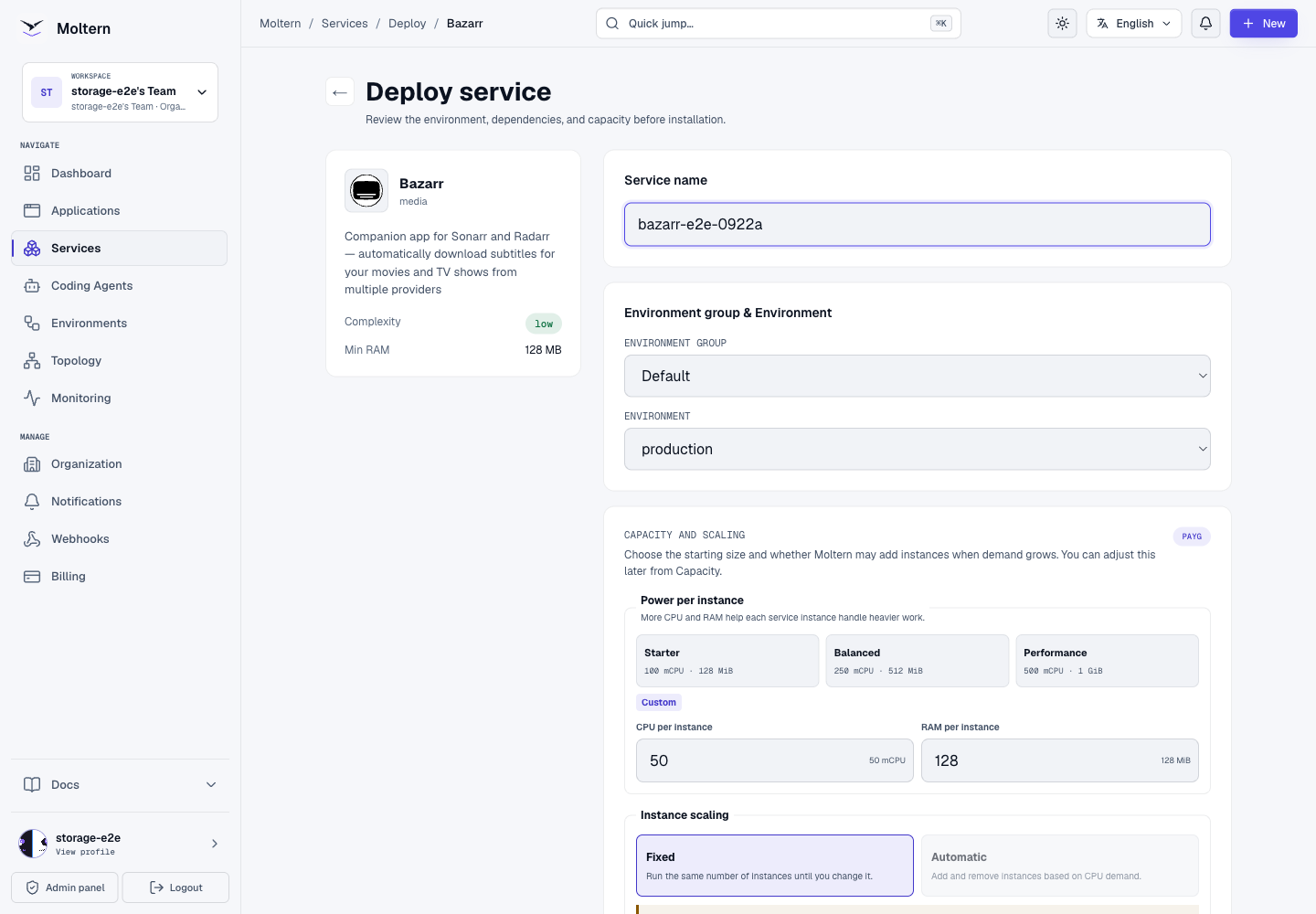
- Open Services, find Bazarr, and select Deploy.
- Enter a unique service name and choose the environment.
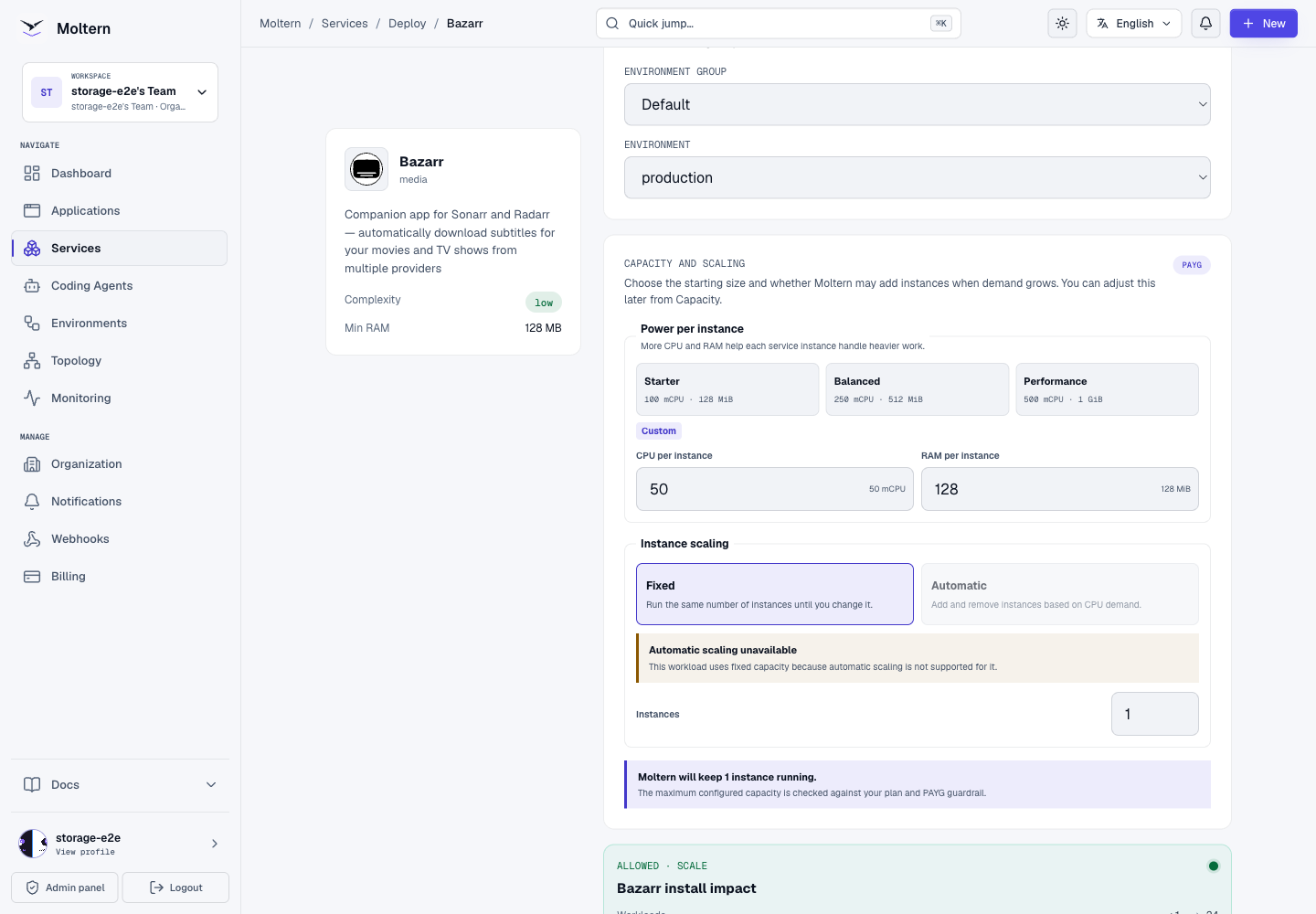
- Review Capacity and scaling. Start with one fixed instance.
- Select Preview deploy and review the workload, storage and plan impact.
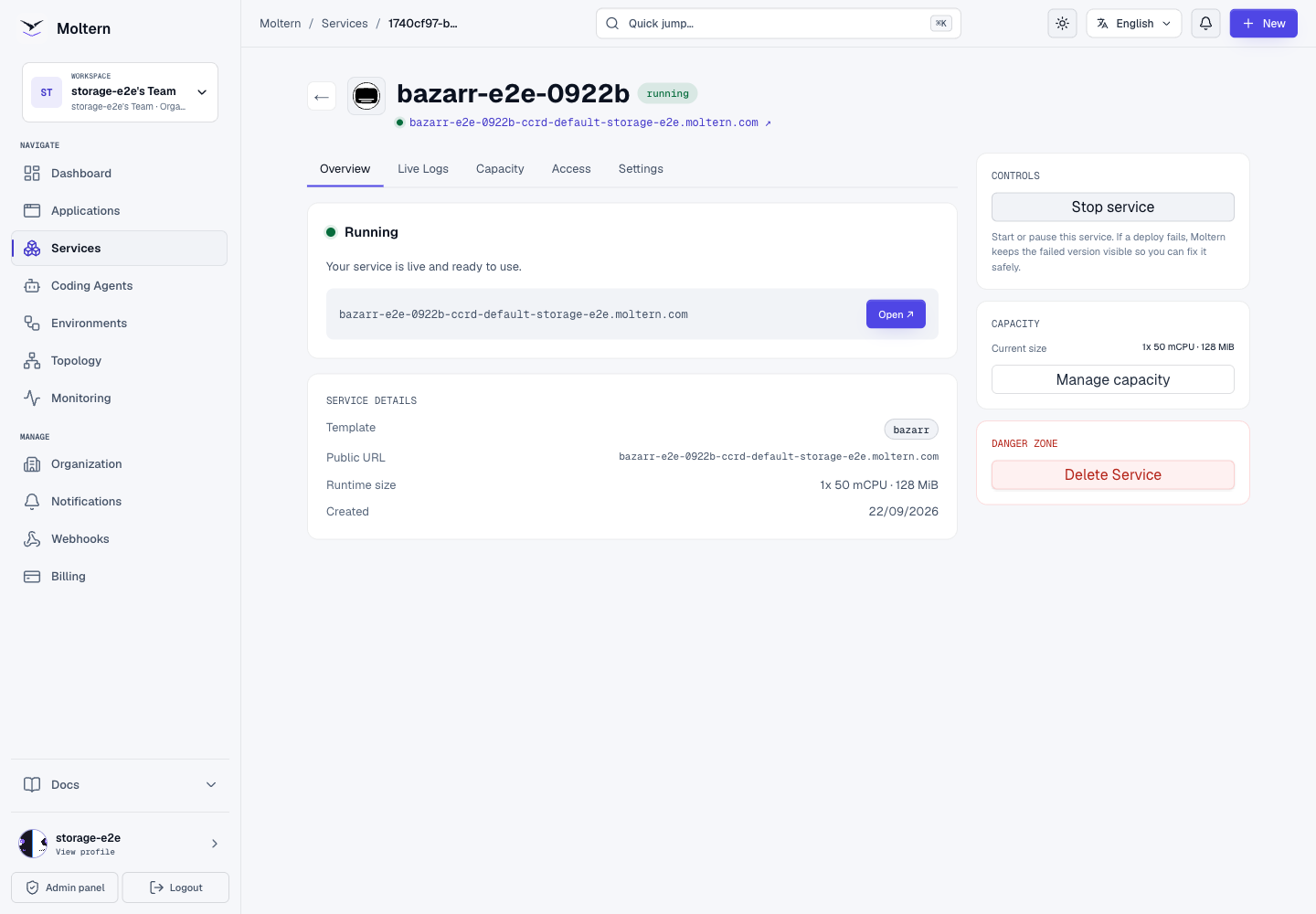
- Confirm the deployment and wait for Moltern to report the service healthy.
- Open the generated HTTPS URL.
Bazarr stores its application database, settings, logs and backups under its
private /config path on the workspace filespace. The deployment does not
create a Bazarr-specific cloud disk.
The first startup can take about a minute while the image initializes its configuration database. Moltern uses HTTP startup, readiness and liveness checks; an open TCP port alone is not treated as a healthy application.
Secure The Web Interface
A fresh Bazarr installation starts without application authentication. Enable it before sharing the URL:
- Open Settings > General.
- Under Security, set Authentication to Form.
- Set a unique username and strong password.
- Save the settings and open the service in a private browser window.
- Confirm that Bazarr shows the login screen and rejects unauthenticated API requests.
Store the credential in your approved password manager. Do not reuse your Moltern password and do not put the Bazarr API key in screenshots, tickets or source control. Regenerating the API key invalidates clients that still use the old value.
Create A Language Profile
Language profiles tell Bazarr which subtitle variants to search for:
- Open Settings > Languages.
- Add the languages that should be available to profiles and save.
- Select Add New Profile.
- Give the profile a descriptive name and optional tag.
- Add one or more languages and choose normal, forced or hearing-impaired subtitle behavior.
- Optionally choose a cutoff language, then save the profile and the page.
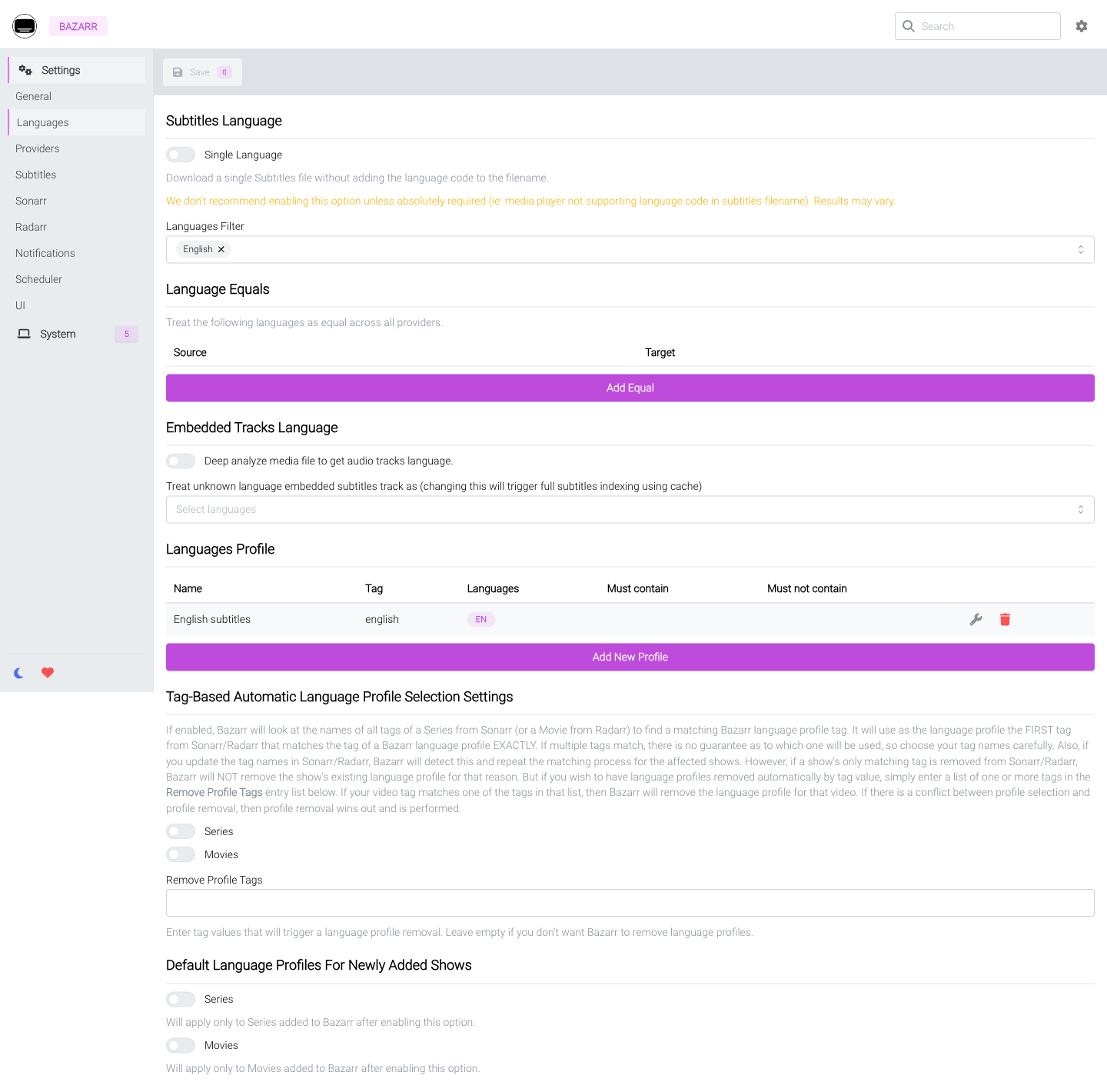
The validated workflow created an English profile, stopped the Bazarr service,
started a replacement runtime and reopened the same profile. The SQLite
integrity check returned ok after replacement.
Connect Sonarr And Radarr
Configure only the library managers you use:
- In Sonarr or Radarr, create or retrieve an API key from its security settings.
- In Bazarr, open Settings > Sonarr or Settings > Radarr.
- Enable the integration and enter the private host, port and API key.
- Use port
8989for a default Sonarr installation or7878for a default Radarr installation unless that service uses a different port. - Leave Base URL empty unless the target is deliberately served below a path prefix.
- Select Test, require a successful result, then save.
Do not expose Sonarr or Radarr publicly just to connect Bazarr. The services should communicate through an explicitly authorized private connection. This Moltern template has not yet certified that private attachment flow.
Keep Media Paths Consistent
Bazarr must read the same files that Sonarr or Radarr reports. If the services see different paths, configure a deliberate path mapping. A mapping changes path names; it does not create filesystem access. Never point Bazarr at another service's private configuration directory.
The current Moltern template persists /config only. It does not mount a
shared movies or series directory, so a real subtitle download and write-back
workflow remains blocked pending explicit media-library attachment support.
Configure Subtitle Providers
After library connectivity and media access are ready:
- Open Settings > Providers.
- Add at least one provider supported in your region.
- Enter provider credentials only in Bazarr's protected settings.
- Save and review System for provider authentication or rate-limit errors.
- Test with media you are authorized to manage.
Moltern permits Bazarr to reach public HTTP and HTTPS providers while blocking private, link-local, metadata and reserved address ranges. A live validation reached the public GitHub API with HTTP 200 after this policy was corrected. Provider availability, licensing and account terms remain the provider's responsibility.
Operate The Service
Use the Bazarr service page in Moltern for:
- Live Logs to investigate startup, provider, database and library-sync errors.
- Capacity to review CPU and memory before applying a change.
- Access to open the generated URL and manage domains where available.
- Settings for service configuration and lifecycle actions.
Bazarr is a stateful single-instance service. Automatic replica scaling is not enabled because concurrent replicas would share the same local configuration database and scheduled jobs without an application-supported coordination model.
Stopping the service removes its runtime. Starting it creates a replacement
pod and remounts the same private /config path. The validated profile
survived two replacements, and the stored database remained internally
consistent. That graceful test is not proof against every interrupted write or
storage outage.
Storage, Backup And Recovery
Bazarr's scheduled backups default to /config/backup, which is inside the
persistent service path. An on-service backup helps with local mistakes but is
not independent disaster recovery. Copy tested backups to a separate protected
location on a schedule appropriate for your data.
The upstream project warns against placing its SQLite configuration on NFS.
Moltern's validated workspace path uses SMB-backed shared storage rather than
NFS, and graceful replacement plus PRAGMA integrity_check passed in this
test. Abrupt-write failure, concurrent-writer and independent restore scenarios
remain uncertified, so keep a tested external backup before production use.
Storage is collected in bytes and can display as 0 GiB for a small
installation because the UI rounds to GiB. The tested configuration occupied
411,081 bytes both in /config and in the storage inventory sample. Usage
collection is periodic; recent changes can appear in the next sample.
Delete A Test Installation
Export any settings you need and remove provider/API credentials first.
- Open the Bazarr service in Moltern.
- Select Delete Service.
- Choose Delete stored data for a disposable installation.
- Complete the protected account confirmation.
- Wait for the service and its storage path to disappear.
Choosing Keep workspace files intentionally retains configuration and continues storage accounting. The validated full-delete flow removed the runtime and service path, closed its resource allocation and left the existing workspace filespace claim intact. It did not create or delete a dedicated PVC.
Troubleshooting
| Symptom | What to check |
|---|---|
| Service remains in deployment | Review Live Logs and wait for the HTTP startup check; first initialization is not instant. |
| GitHub release or provider connection errors | Confirm the current chart is deployed and review provider status, DNS and public egress. Repeated redeploys do not fix provider credentials. |
| Sonarr or Radarr test fails | Do not use localhost. Verify private reachability, target port, API key and any base URL. |
| Library appears but subtitle writes fail | Confirm Bazarr has direct access to the same media path. Path mapping alone does not mount files. |
| Bazarr opens without a login | Enable Form authentication under Settings > General before sharing the URL. |
| API returns 401 | Authenticate through the UI or send the current Bazarr API key using the method documented by Bazarr. Do not print it in logs. |
| Database is locked after a storage change | Stop writes, preserve /config, inspect storage compatibility and restore from a tested backup. Do not repeatedly restart over a damaged database. |
| Small workload shows 0 GiB | Check the byte measurement and timestamp; GiB display rounding can hide small non-zero usage. |
Frequently Asked Questions
Does Bazarr replace Sonarr or Radarr?
No. Bazarr consumes library metadata from Sonarr and Radarr and manages subtitles for that media. It is not a movie or series library manager.
Can I use Bazarr before connecting a media library?
You can secure the UI and prepare language profiles, providers and settings. Subtitle discovery and write-back require a working library connection and shared media access.
Does Moltern automatically create Sonarr and Radarr?
Not in the current Bazarr template. Deploy compatible services separately and wait for Moltern's explicit private connection and media attachment workflow before treating the full stack as production-ready.
Is Bazarr configuration persistent?
Yes. Moltern persists /config in the service's isolated workspace path. The
tested language profile and authentication setting survived runtime
replacement. Keep independent backups for recovery.
Can I run more than one Bazarr replica?
The catalog uses one fixed replica. Do not scale a shared SQLite configuration and scheduler horizontally without upstream-supported coordination and a tested storage design.